What AI-Enhanced Design Actually Looks Like in Practice
There's no shortage of opinions about how designers should be using AI.
Most of them are either too abstract to act on or too tool-specific to generalize. What’s harder to find are honest accounts of what actually happened on a real project — what the workflow looked like, where AI created genuine value, and what stayed stubbornly human throughout.
This is one of those accounts.
Over the past year, I’ve been developing and refining a structured approach to AI-enhanced design — one that focuses less on which tools to use and more on where in the process AI creates meaningful leverage. It started as an experiment on my own client work at Fennec Design Studio. It’s since shaped how I approach every research-intensive engagement, and it’s the foundation of a course I now teach on Maven.
Here’s what it looks like in practice, using a recent project as an example.
The Project
A hardware company came to Pixo with a field operations problem.
When something goes wrong with one of their devices, a technician has to go on-site to diagnose it. That process was slow, inconsistent, and almost entirely manual, with technicians relying on memory, printed documentation, and back-and-forth phone calls to resolve issues. Nothing was captured in a standardized way. Context got lost. Service tickets were incomplete.
The goal was a mobile web app — something a company employee or third-party technician could pull up on their phone while standing in front of a piece of equipment, run through diagnostics, troubleshoot in real time, document the issue, and attach everything to a service ticket without leaving the field.
A focused tool. High utility. Zero tolerance for friction — because the person using it is already dealing with broken equipment. Additionally, to do their work, technicians are often physically positioned in such a way that their field of vision is obstructed and they are unable to view, in real-time, the effects of their troubleshooting efforts.
Where AI entered the process
Before any prototype screens were designed, there was research to synthesize.
That meant user interviews with field technicians, a review of existing internal documentation, and an audit of how service tickets were actually being written in practice versus how they were supposed to be written. It was a significant body of material, the kind that would traditionally take weeks to organize, code, and turn into actionable design direction.
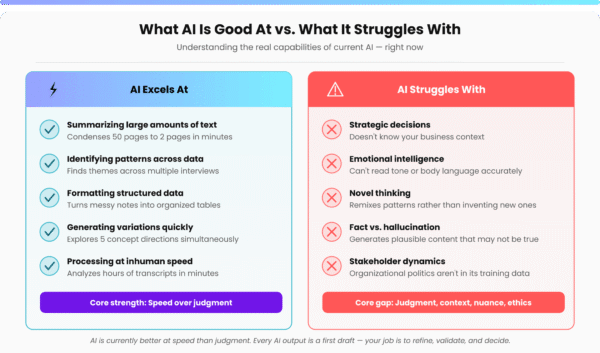
Using a structured AI-assisted synthesis approach, that timeline compressed substantially. Interview transcripts were loaded into a secure LLM-based analysis environment and coded for themes using structured prompts. The AI surfaced candidate themes. I validated them, challenged the ones that felt too broad, and flagged the outliers that turned out to matter most. It’s worth being specific about that division of labor: AI accelerated the pattern-finding. The judgment about what those patterns meant — and what to do about them — stayed mine.
From that synthesis came a design context document: research-backed personas, Jobs-to-be-Done statements, experience principles, and a prioritized set of functional requirements. Not a deliverable for its own sake — a brief specific enough to actually drive the next phase.
That brief then became the input for AI-assisted concept generation.
Rather than starting from a blank canvas, I used a design context document to write structured prompts for an AI-powered frontend generation tool. The prompts were grounded in what the research had surfaced: who uses the tool, in what physical environment, under what kind of pressure, with what level of technical fluency. The result was a set of concept directions that were meaningfully differentiated and traceable back to the research—not just aesthetic variations on a theme.
Those concepts were evaluated by me as the human designer against research criteria before anything went to stakeholders. The ones that survived went into a working prototype. The prototype went to users. Their feedback shaped the final design.
AI played a meaningful role in three distinct phases: synthesizing a large body of research quickly, generating differentiated concept directions from structured context, and accelerating front-end iteration. In each case, it was doing something it’s genuinely good at—processing volume, surfacing patterns, generating variations at speed. The validation loop, the quality bar, and the final calls stayed human throughout.
What this produced that traditional processes don't
The project didn’t just move faster. It produced something qualitatively different.
When concepts are generated from structured research context rather than intuition alone, they tend to hold up better in stakeholder reviews because they can be defended with evidence, not just aesthetic rationale. When synthesis is AI-assisted, you can bring more source material into the process without the timeline blowing out. When the design brief is specific enough to write real prompts from, the gap between research and execution shrinks.
Furthermore, as a human researcher conducting the user and stakeholder interviews, I know that I will have the transcripts and AI pattern recognition, post-interview. This enables me to be fully present during the interviews and allows me to pay close attention to non-verbal cues, and probe further. In short, to be more human. This approach elicits additional, varied, and nuanced context that might have previously been missed had we taken a more traditional approach of scribing in real time, and frantically documenting the conversation.
For this client, that meant a mobile tool their technicians actually wanted to use — not because it was beautiful, because it matched how they actually work and included affordances for their physical environment.
What this means if you're buying design or development services
If your team is evaluating partners for a custom application build, AI fluency is worth asking about directly—but ask specifically.
“Do you use AI?” is the wrong question. Almost everyone will say yes.
The better questions are:
- Where in your process does AI create leverage?
- How do you ensure the output is grounded in real user needs?
- What does your synthesis workflow look like when you’re working with a large body of research or documentation?
Partners who can answer those questions with specifics—methods, trade-offs, validation steps—are doing something materially different from partners who use AI to generate copy or UI and call it done.
At Pixo, that kind of rigor shows up across the stack: in how discovery is conducted, how complex technical problems are framed, and how front-end interfaces are generated and iterated. The question isn’t whether to use AI in a build; it’s how to use it without sacrificing the quality that makes the end product actually work for the people using it.
At Fennec, I use the workflow described above for every research-intensive engagement. It’s also what I teach.
The Course
I’ve built a 13-week course around the process behind this project; this isn’t proprietary.
AI-Enhanced Research & Design is hosted on Maven. It’s designed for designers who want to move beyond isolated AI experiments and build a workflow that holds up on real projects.
Students work through a full research-to-delivery project: research foundation, AI-assisted synthesis, design context development, AI-informed concept generation, prototyping, and validation. Every phase produces real artifacts. The final deliverable includes documented ROI — time saved, process improvements, and a case study ready for a portfolio or client conversation.
Enroll at maven.com/lucas-blondheim/ai-enhanced-research-design —team discounts available.
About the author

Lucas Blondheim is the founder of Fennec Design Studio, a boutique UX and product design consultancy specializing in enterprise SaaS, Salesforce Ecosystem, and AI-native product design based near Boston, Massachusetts.